
NPV Tunnel Config Guide: How to Get, Create and Import a Working Config File
Search for NPV Tunnel and "config" is one of the first words that shows up next to it. That makes sense: the app is only a client, so a config is the thing that decides whether it works at all. This guide explains what a config is, the honest ways to get one, how to build your own and how to test it, in plain language.
What is a config in NPV Tunnel?
A config is a small set of instructions that tells the app where to connect and how. Think of it as an address plus a key: the address is your server, the key is the password, UUID or certificate that proves you are allowed in. NPV Tunnel's store listing describes the app as a client that "does not provide VPN servers or subscription credentials", so a compatible configuration from your own server or provider is required.
Where do you get a config? The honest options
| Source | Best for | What you receive |
|---|---|---|
| Your own server (VPS) | Full control and privacy | A share link, QR code or the details to type in |
| A provider you trust | No technical setup | A subscription link or a config file |
| A person or organisation that runs a server | Family, friends, teams | A locked file, usually with a passphrase or tied to your public key |
| An SSH account | Simple access to one server | Host, port, username and password |
Config formats you will meet
| Format | Looks like | How to add it |
|---|---|---|
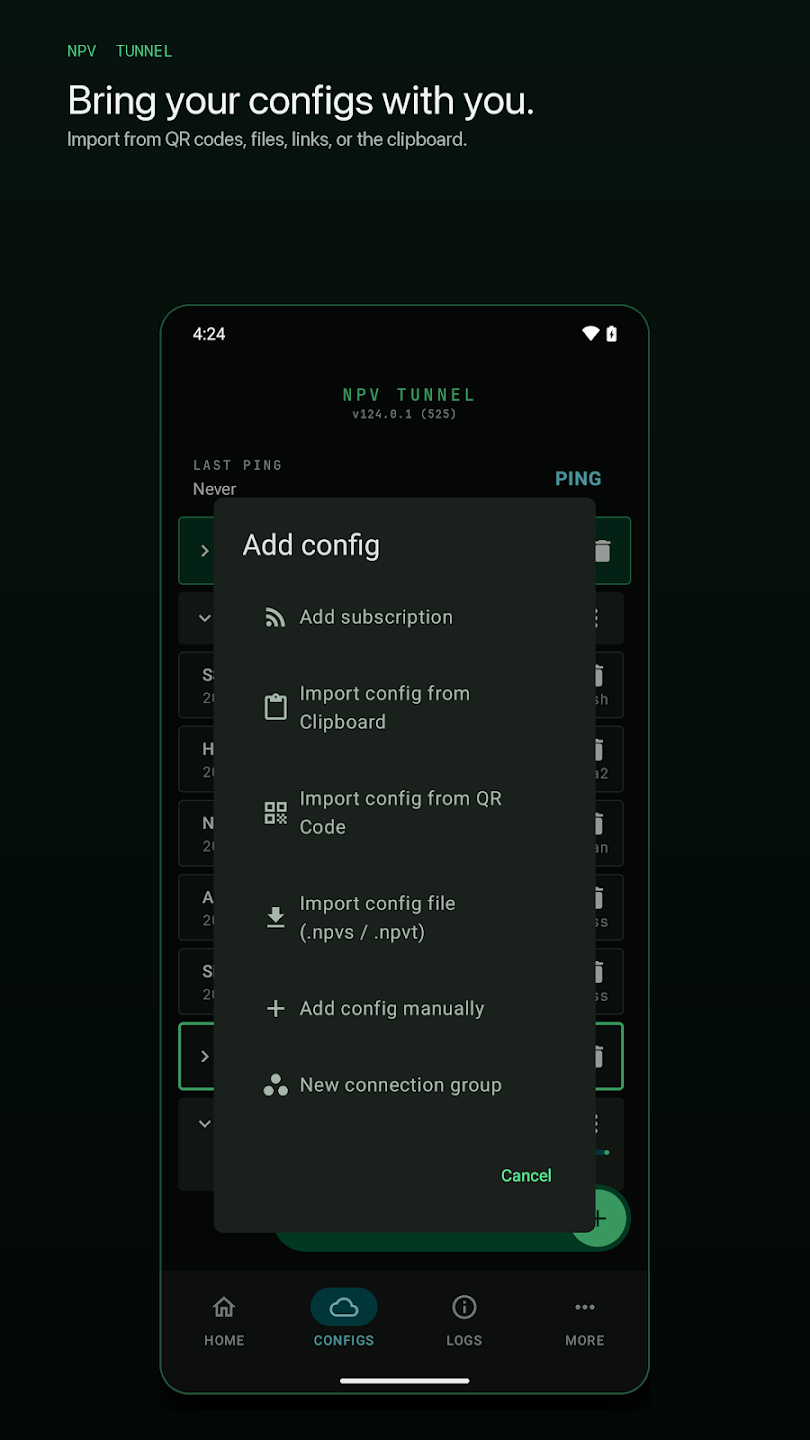
| Share link | vless://… vmess://… trojan://… ss://… hysteria2://… | Copy it, then Import config from Clipboard |
| Subscription URL | https://provider.example/sub/abc123 | Add subscription |
| QR code | A square code on a screen or image | Import config from QR Code |
| Config file | .npvs / .npvt (and older .npv4) | Import config file |
| WireGuard configuration | Interface and peer details from your provider | Import as provided |
| Custom Xray JSON | A JSON document | Paste or import as a custom configuration |
| SSH account | Host, port, user, password | Add config manually → SSH Config |
The file formats are covered in detail in our config file guide, and every import step is in how to use NPV Tunnel.
How to create your own config (three routes)
Route 1: VLESS with REALITY on a VPS (recommended)
- Rent a small VPS from any provider in a location close to you. The cheapest plan is enough for personal use.
- Install an Xray server. Most people use a web panel such as 3x-ui or a one-line installer that sets everything up.
- Create an inbound using VLESS + REALITY on port 443 with the
xtls-rprx-visionflow, as explained in VLESS vs VMess vs Trojan. - Add a client. This generates a UUID for that user.
- Copy the share link or show the QR code the panel produces.
- Import it into NPV Tunnel, run Ping, then connect.
Route 2: An SSH config
If your server already accepts SSH logins, no extra software is needed. Open Configs → + → Add config manually → SSH Config and fill in host, port, username and password or key. The full walkthrough is in SSH tunnel with NPV Tunnel.
Route 3: WireGuard
Set up WireGuard on your server, create a peer for your phone and import the configuration it produces. WireGuard is quick and gentle on battery, though easy for strict networks to recognise.
What a valid config must contain
| Protocol | Needs at minimum |
|---|---|
| VLESS | Server address, port, UUID, security (TLS or REALITY), SNI, and for REALITY the public key and short ID |
| VMess | Address, port, UUID, transport settings, TLS details if used |
| Trojan | Address, port, password, SNI |
| Shadowsocks | Address, port, password, cipher |
| Hysteria2 | Address, port, password, SNI, and obfuscation password if enabled |
| WireGuard | Your private key, the server's public key, endpoint and allowed IPs |
| SSH | Host, port, username, password or key |
| DNSTT | Tunnel domain, public key and a resolver |
If one of these items is missing or mistyped, the import may still succeed but the connection will fail. That is why a ping test comes before everything else.
How to test a config in two minutes
- Import the config and check its name and expiry in the Configs tab.
- Ping it. A number in milliseconds means the server answers. A timeout means address, port or network problem.
- Connect from Home and watch the downlink and uplink counters move.
- Open the Logs tab if anything looks wrong. The last lines name the problem.
- Check your IP in a browser. It should now show the server's address, not your own.
Why a config that worked yesterday stops working
- It expired or reached its data limit. The library shows expiry details.
- The server changed: new IP, new port or a rotated key. Re-import the updated link or refresh the subscription.
- The address was blocked on your network. Try another config or protocol.
- Too many people use it, which is typical of "free" configs.
- Your clock is wrong, which breaks TLS-based protocols.
The full checklist is in NPV Tunnel not connecting.
Sharing and protecting your config
A config is a key. If you hand yours to others, lock it, set an expiry and deliver it to specific public keys or with a passphrase. The step-by-step is in share and lock configs. Keep a backup of your own configs somewhere safe, and delete the ones you no longer use.
Managing many configs
Name them clearly, group the good ones into a Smart Route group and let the app pick the fastest. Subscriptions refresh themselves, so you do not have to re-import anything when your provider changes servers.
Frequently asked questions
Where can I download an NPV Tunnel config file?
From your own server, a provider you trust or whoever runs the server you use. The app does not include configs, and we do not distribute them. Public free configs are shared by many people, expire quickly and can be risky.
What is an NPV Tunnel config?
It is the set of connection details the app needs: server address, port, protocol and credentials. It can be a file, link, QR code, subscription or manual entry.
What is the difference between .npv4, .npvs and .npvt files?
.npv4 is the older NapsternetV config format. Recent builds of the app list .npvs and .npvt in the import file option. Update the app if a file will not open.
Can I create my own NPV Tunnel config?
Yes. Set up a VLESS, Trojan, WireGuard or SSH server, then import its share link, QR code or details. A small VPS is enough for personal use.
Why does my config import but not connect?
Usually it has expired, hit its data limit, the server changed or the clock is wrong. Run Ping and read the Logs tab.
Can I edit a config after importing?
Open configs can be edited. Locked configs cannot be viewed or edited by recipients, which is by design.
How do I back up my configs?
Export your own unlocked configs and store the files safely. Test a restore once to be sure it works.
Keep reading
NPV Config Files Explained: .npv4, .npvt and .npvs
What are .npv4, .npvt and .npvs files? Learn how NPV Tunnel imports config files, why some…
How to Use NPV Tunnel: A Complete Setup Guide for Beginners
Learn how to use NPV Tunnel step by step: install, import a config by file, QR, link or cl…
How to Share and Lock NPV Tunnel Configs Safely
Share an NPV Tunnel config without leaking it: Lock it vs Keep it open, the secrecy meter,…