
How to Set Up an SSH Tunnel in NPV Tunnel, Step by Step
SSH is the easiest way into tunnelling if you own a Linux server, because you already have everything you need: an address, a username and a password or key. NPV Tunnel treats SSH as a first-class config type.
What you need
- The server's IP address or hostname.
- The SSH port (22 by default; many providers use another).
- A username and password, or a private key if you use key authentication.
- Permission from the server owner to forward traffic. Some servers disable it.
Create the config
- Open Configs and tap the green +.
- Choose Add config manually, then SSH Config.
- Enter a clear name, such as "My VPS Frankfurt".
- Fill in host, port, username and password (or key).
- Save, then tap Ping to confirm the server responds.
- Go to Home and connect.
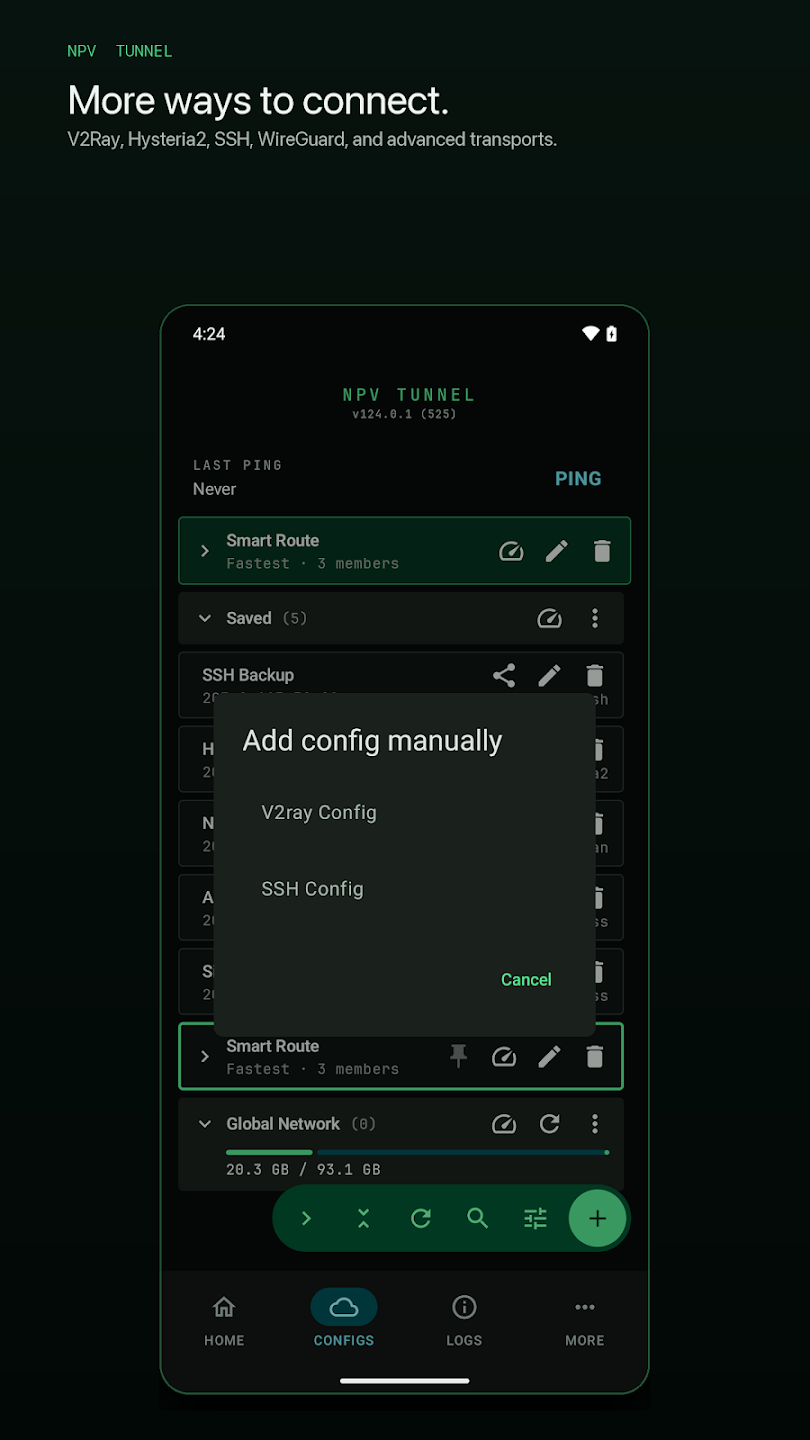
Provider-supplied SSH accounts
If a provider gave you the details, enter them exactly. Copy and paste to avoid typos, and watch for trailing spaces. Many providers set a limited lifetime or a limit on simultaneous logins, so a second device logging in can kick the first off.
Why SSH is a good starting point
- No extra server software, just OpenSSH.
- Strong encryption by default.
- Easy to test from a computer first.
Where SSH falls short
- It was designed for terminals, not as a general VPN, so speed over long distances can be lower than WireGuard or Hysteria2.
- Because it runs over one TCP connection, a stall blocks everything on it.
- Its handshake is recognisable on strict networks.
Troubleshooting
| Symptom | Likely cause | Fix |
|---|---|---|
| Authentication failed | Wrong username/password or key | Test the login from a PC; re-enter |
| Timeout | Wrong port, firewall | Check port; try another network |
| Connects, no pages load | Forwarding disabled | Ask the server owner to allow TCP forwarding |
| Drops after network change | Old build | Update the app; Android 124.0.37 notes mention SSH reconnect fixes |
Security tips
Prefer key authentication, disable root password logins on your own server, and use a non-default port only as a minor nuisance filter. Do not share your SSH credentials in a public config.
Want to compare options? See protocols explained.
Prepare your server (if it is yours)
- Make sure OpenSSH is installed and running.
- In
sshd_configkeepAllowTcpForwarding yes. - Create a dedicated user with no shell access if you only want tunnelling.
- Prefer key authentication and disable password logins once it works.
- Use a firewall to allow only the SSH port.
Test on a computer first
Before blaming the phone, test the account from a computer: ssh -D 1080 user@server -p 22 opens a local SOCKS proxy on port 1080. If that works, your credentials and forwarding are fine and the same details will work in NPV Tunnel.
Making SSH more resilient
- Android 124.0.37 includes improved SSH reconnects after network changes; iOS 57.2 improved SSH reliability and secure-storage handling.
- If the connection dies after minutes of idleness, a keep-alive setting on the server (
ClientAliveInterval) helps. - Limit one user to one device if the provider forbids simultaneous logins.
SSH versus the V2Ray family
SSH is simple and trustworthy but is not built to look like ordinary web traffic. If SSH works on your network, enjoy the simplicity. If not, a protocol such as VLESS with REALITY or Trojan is the natural next step. For networks that block nearly everything, see DNSTT.
Frequently asked questions
Do I need a VPS to use SSH in NPV Tunnel?
You need an SSH account on some server, either your own VPS or one from a provider.
Why does SSH say authentication failed?
Check the username, password or key. Some providers expire accounts or limit logins.
Is SSH slower than other protocols?
It can be, especially on long or lossy links, because it runs over a single TCP connection.
Can I use key authentication?
Key-based login is the recommended approach where the app and your server support it.
Keep reading
NPV Tunnel Supported Protocols Explained in Plain English
Every protocol NPV Tunnel supports explained simply: VLESS, VMess, Trojan, Shadowsocks, SS…
NPV Tunnel Not Connecting? 12 Fixes That Actually Work
NPV Tunnel won't connect or keeps dropping? Try 12 proven fixes: expired config, wrong clo…
VLESS vs VMess vs Trojan vs Shadowsocks: Which One Should You Use?
VLESS, VMess, Trojan and Shadowsocks compared in plain language: speed, encryption, REALIT…