
NPV Config Files Explained: .npv4, .npvt and .npvs
Sooner or later someone sends you a file ending in .npv4 and says "just import it". Here is what you are actually holding and what to do with it. For the bigger picture of configs in general, see our NPV Tunnel config guide.
What is a config file?
A config file is a packaged set of connection settings: the server address, port, protocol, credentials and transport options. Because it holds everything the app needs, one file can replace twenty fields of manual typing. Files made for NapsternetV have long used the .npv4 extension; newer builds of NPV Tunnel refer to .npvs / .npvt in their file-import option. Which one you have depends on the app version that created it.
What can be inside
- Server details and protocol settings (V2Ray, SSH and others).
- Credentials the server needs.
- Optional extras the creator sets: an expiry date, a data limit, or a lock that stops you viewing the details.
That last bit matters. Creators who share configs with many people often lock them so the server details do not leak. A locked config still connects; you just cannot read or edit what is inside. The app can also show the expiry date and usage in your library.
How to import a file
- Save the file to your phone (from Telegram, email, a cloud drive, anywhere).
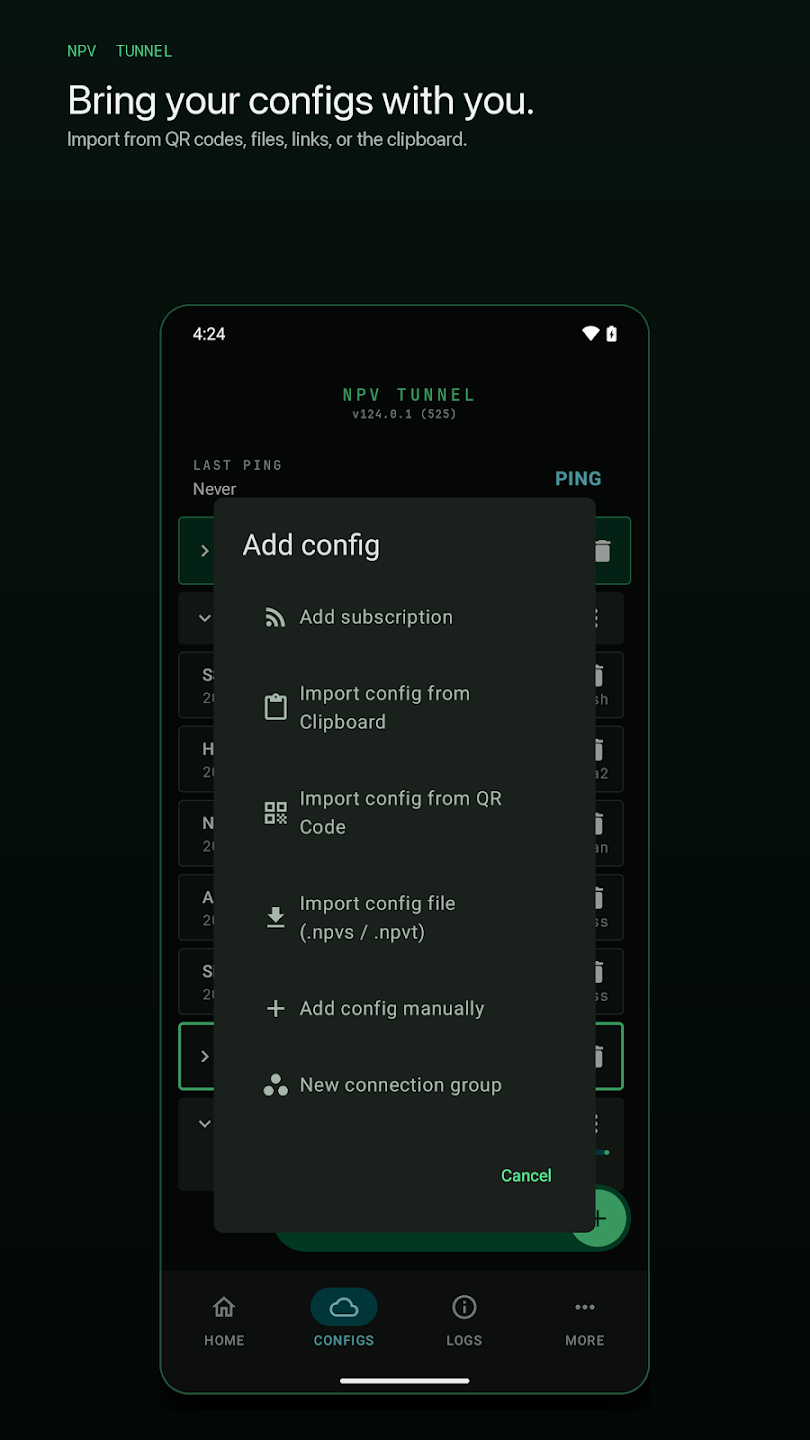
- Open NPV Tunnel and go to the Configs tab.
- Tap the green + and choose Import config file.
- Pick the file. If it asks for a password or passphrase, enter the one the sender gave you.
- The config appears in your library. Tap it, run a Ping, then connect from Home.
Why the import fails
- File not recognised: your app is older than the file's format. Update from the store.
- Wrong password: ask the sender again, and check capital letters.
- File renamed by a messenger: some apps add
.txtto the end. Rename it back. - Expired config: the file imports but cannot connect. The library shows the expiry date.
The safety part, honestly
A config tells your phone to send traffic to a specific server. If you import one from a stranger, you are trusting that server operator with your traffic, so:
- Only import files from a source you trust.
- Never type account passwords into a website that promises to "unlock" or "convert" NPV files. Those are a favourite trick for stealing credentials.
- Delete configs you no longer use.
- If you create configs for others, use the lock option and a passphrase. See how to share and lock configs.
New to all this? Go back to the beginner setup guide.
Creating and sharing your own file
If you run a server, you can package settings for your users. In the config's export screen choose whether the file is locked, how it is delivered (to specific public keys, with a passphrase or as a link) and give it a clear filename. The complete process is in share and lock configs. Good practice is to create one file per person so you can retire a single one if it leaks.
Expiry dates and data limits
Release notes for iOS 20.0 added expiry-date lock support, and the library shows expiry and usage information for each config. When a locked config expires, newer Android builds show clearer log messages. If a config suddenly stops working on the date your provider gave you, that is expected: ask for a renewal rather than debugging the network.
Troubleshooting import problems
| Problem | Try this |
|---|---|
| Nothing happens when you tap the file | Open NPV Tunnel first, then use Import config file and pick it from there |
| File appears as "unknown type" | Rename it back to the original extension, or share it again as a document rather than media |
| "Invalid file" or "decode error" | Download it again; update the app; confirm the sender did not edit it |
| Imports but will not connect | Check expiry, run Ping, read Logs |
| Files will not open on an older phone | Android release 124.0.37 mentions a fix for files opening on 32-bit phones; update |
Backing up your configs
Export your own configs (unlocked) and store the files in a safe place, such as a password manager attachment. Android 124.0.37 also fixed issues with restored configs crashing the app, so keep your backups in the latest format and test a restore once.
Frequently asked questions
What is an .npv4 file?
It is a configuration file used by NapsternetV and NPV Tunnel that holds connection settings and sometimes an expiry date or lock.
Why does the file ask for a password?
The creator protected it with a passphrase. Ask whoever sent it for the password.
Can I open an .npv4 file in a text editor?
Do not rely on that. The files are designed to be read by the app and are often protected, so editing them by hand is unreliable.
Is it safe to import a file someone sent me?
Only if you trust the sender. A config sends your traffic to the server inside it.
Keep reading
How to Share and Lock NPV Tunnel Configs Safely
Share an NPV Tunnel config without leaking it: Lock it vs Keep it open, the secrecy meter,…
How to Use NPV Tunnel: A Complete Setup Guide for Beginners
Learn how to use NPV Tunnel step by step: install, import a config by file, QR, link or cl…
Is NPV Tunnel Safe? Permissions, Privacy and Practical Safety Tips
Is NPV Tunnel safe? Learn why it needs VPN permission, who can see your traffic, how ads a…