
How to Share and Lock NPV Tunnel Configs Safely
If you run a server and want friends, family or customers to connect, sharing a plain config is risky: anyone can copy it and pass it on. NPV Tunnel has built-in tools to control that. This guide walks through them.
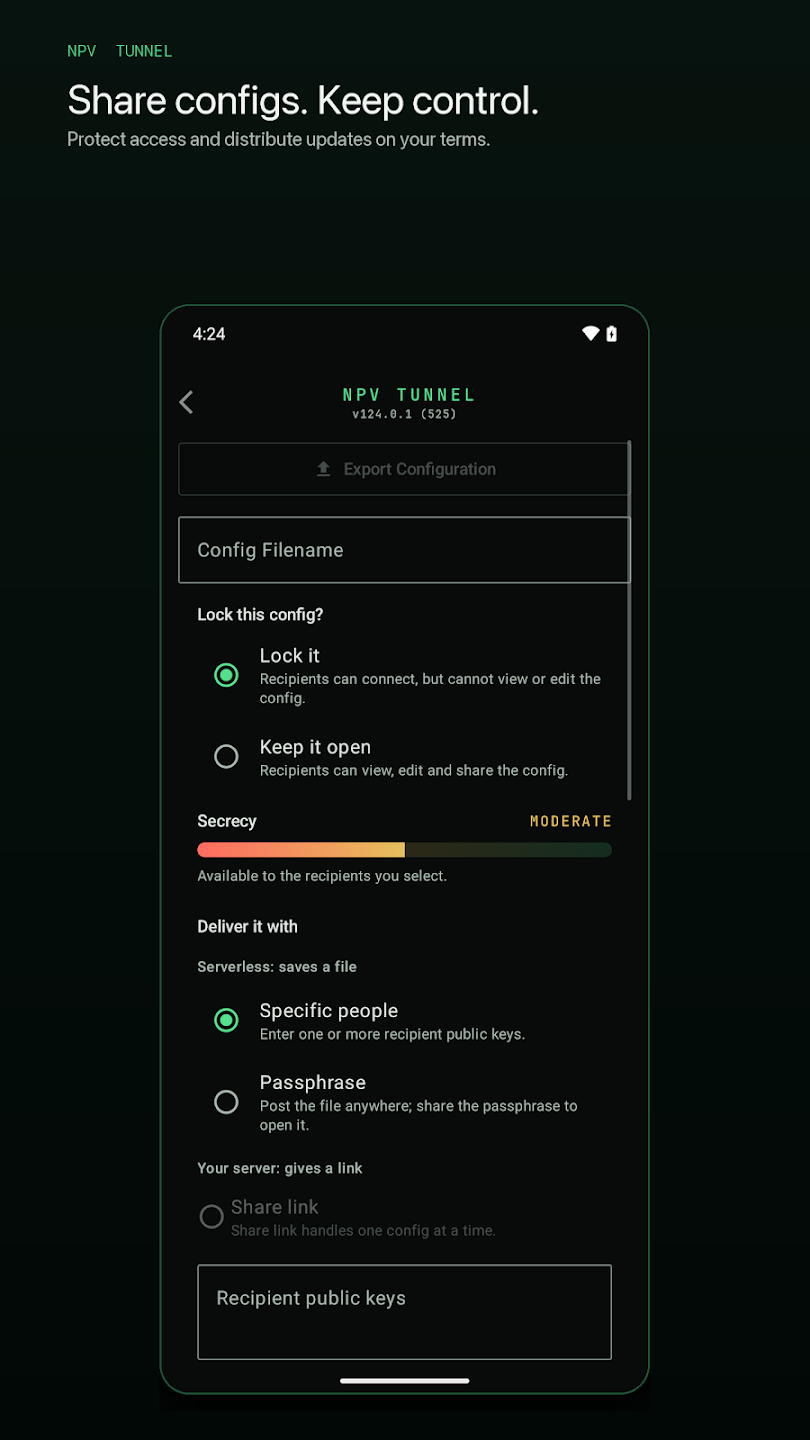
Open the export screen
In the Configs tab, open the config you want to share and choose export. You will see Export Configuration with a filename field and a few decisions to make.
Decision 1: Lock this config?
- Lock it: recipients can connect, but cannot view or edit the config details. Best for sharing with people who do not need to see your server data.
- Keep it open: recipients can view, edit and share the config further. Best for your own devices or trusted co-admins.
The secrecy meter
The screen shows a meter, from low to high, that reflects how well the config is protected given your choices. It is a quick sanity check: unlocked and delivered to everyone sits low; locked and delivered to a named person sits higher.
Decision 2: How to deliver it
Specific people (public keys)
The recipient opens More → My public key in their app and sends you that key. You paste one or more recipient public keys into the Recipient public keys box. Only those people can open the file. This is the strongest option, and it replaced the old device-ID locking on iOS in version 57.0.
Passphrase
You set a passphrase. The file can then be posted anywhere, such as a Telegram channel, and only people who know the passphrase can open it. Share the passphrase through a different channel than the file.
Share link
If you run your own server, the app can give a link. The listing notes that a link handles one config at a time.
Anyone with the app
The App Store description also lists sharing a protected config with all app users, and the latest Android release notes mention "Anyone with the app" files. This is convenient for public distribution, but anyone who has NPV Tunnel can open the file, so do not use it for configs that must stay private.
Best practices
- Prefer public-key delivery for important configs.
- Set an expiry date or data limit when possible, so a leaked file loses value.
- Create a separate config per person or group so you can revoke one without breaking everyone.
- Never send the passphrase and the file in the same message.
- Rotate credentials on your server if a file leaks.
For recipients
Import the file (see config file guide), enter the passphrase if asked and connect. If a locked config says it is expired, ask the owner for a new one.
Sharing scenarios and the best option for each
| Scenario | Recommended |
|---|---|
| Your own second phone | Keep it open, deliver to your other device's public key |
| A family member | Lock it, deliver to their public key |
| A group of customers | One locked file per customer with an expiry date |
| A public Telegram channel | Locked file with a passphrase published separately and rotated often |
| A server you run with a web panel | Share link (one config at a time) |
How the public key flow works step by step
- The recipient opens More → My public key and copies or shows the key (it has a retry option in iOS 57.2 if the screen fails to load).
- They send it to you in any chat.
- You open the config, choose Export, set Lock it and paste their key into Recipient public keys.
- You send the exported file. Only the key holders can open it.
Because the file is tied to a key rather than to a hardware device ID, it survives phone upgrades: the recipient just brings their key to the new device.
Revoking access
A locked file cannot be edited by the recipient, but a copy you have already given out stays valid until the credentials inside change or expire. To revoke, change the user's UUID or password on the server, or let the expiry date pass, and issue a new file.
What recent releases changed
iOS 57.0 replaced device-ID locks with public-key sharing. iOS 57.2 fixed export ordering and connection status for locked configs, and Android 124.0.37 improved config security and lets locked V2Ray configs connect on filtered networks.
Frequently asked questions
What does Lock it do in NPV Tunnel?
Recipients can connect with the config but cannot view or edit its details.
What is a public key used for?
It identifies a specific user so a config can be encrypted for them and nobody else can open it.
Is a passphrase secure enough?
A long, random passphrase is fine for casual sharing. For important configs deliver to specific public keys.
Can I share one config with many people?
Yes, but a single leaked copy then affects everyone. Create separate configs for separate people where possible.
Keep reading
NPV Config Files Explained: .npv4, .npvt and .npvs
What are .npv4, .npvt and .npvs files? Learn how NPV Tunnel imports config files, why some…
Is NPV Tunnel Safe? Permissions, Privacy and Practical Safety Tips
Is NPV Tunnel safe? Learn why it needs VPN permission, who can see your traffic, how ads a…
How to Use NPV Tunnel: A Complete Setup Guide for Beginners
Learn how to use NPV Tunnel step by step: install, import a config by file, QR, link or cl…