
NPV Tunnel Smart Route: Let the App Pick the Fastest Server
If you have more than one config, choosing the right one by hand gets old quickly. Connection groups, and in particular Smart Route, let NPV Tunnel decide for you.
What is a connection group?
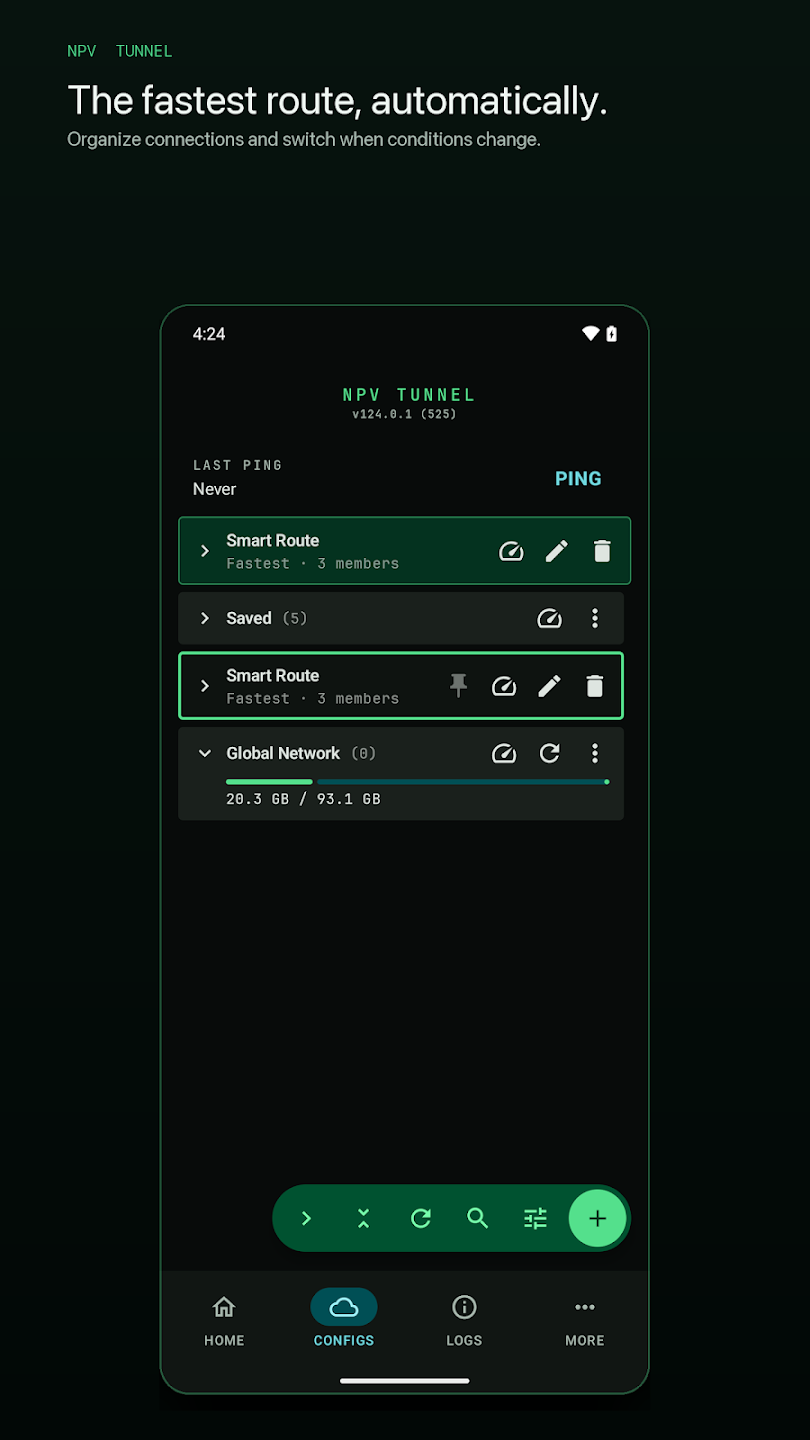
A group is a named bundle of configs. Instead of selecting one server, you select the group and the app picks the member to use. In the screenshot above you can see Smart Route (Fastest · 3 members), a Saved folder and a Global Network subscription that shows usage as a progress bar.
Create a group
- Go to Configs and tap the green +.
- Choose New connection group.
- Name it and add your configs as members.
- Pick how it chooses: fastest, ping before connecting, or a fixed preference order.
Strategies
- Fastest: the app tests members and uses the quickest.
- Ping before connecting: checks which servers answer before it tries.
- Fixed order: tries your first choice, then the next if it fails. Good for "main server, then backup".
Smart tricks
- Mix protocols in one group: for example VLESS and Hysteria2. If one is blocked on a network, the other still works.
- Use the pin icon to keep favourite groups at the top.
- Use the Ping button for the whole library to see which servers are alive.
- Subscriptions refresh automatically, so new servers from your provider appear without manual work.
Why it matters
The App Store notes list smart connection groups, live ping results, usage and expiry details and connection recovery when networks change. Together they take most of the manual fiddling out of daily use.
If groups do not connect, try the steps in not connecting.
Designing a group that really helps
A group is only as good as its members. A strong set combines diversity (different protocols or ports, so one block does not break all of them) and geography (servers in a couple of regions). For example: a VLESS + REALITY config on 443, a Trojan config on a second server and a Hysteria2 config for lossy Wi-Fi. When the first fails, the app moves on without you opening the library.
Fastest versus fixed order
| Strategy | Pros | Cons |
|---|---|---|
| Fastest | Always the quickest server at connect time | May hop between servers; some sites dislike changing IPs |
| Ping before connecting | Avoids dead servers | Adds a short delay |
| Fixed order | Predictable IP; clear primary and backup | Will not switch to a faster server by itself |
Working with subscriptions
Your provider's subscription shows up as a folder in the library (for example Global Network with a usage bar). You can create groups from servers inside it. Because subscriptions refresh automatically, members that the provider removes will disappear, so review your groups now and then.
Organising a big library
- Use clear names such as "DE VLESS 443" rather than "config 3".
- Pin the groups you use daily.
- Collapse folders you rarely touch.
- Delete expired configs. The expiry date appears in the library.
Troubleshooting groups
If a group connects slowly, remove members that always time out. If it never connects, test members individually with Ping first. If connections work only on one network, add a member that suits the other one.
Frequently asked questions
What is Smart Route in NPV Tunnel?
A connection group that chooses among its member configs, for example by picking the fastest one.
How many configs can a group have?
As many as you need, but a handful of well-chosen, different members works better than dozens of similar ones.
Does Smart Route change my IP address?
It can, if it switches to a different server. Use a fixed order if you need a stable IP.
Is the feature available on iPhone?
Yes. Smart connection groups arrived on iOS in version 57.0.
Keep reading
How to Use NPV Tunnel: A Complete Setup Guide for Beginners
Learn how to use NPV Tunnel step by step: install, import a config by file, QR, link or cl…
NPV Tunnel Supported Protocols Explained in Plain English
Every protocol NPV Tunnel supports explained simply: VLESS, VMess, Trojan, Shadowsocks, SS…
NPV Tunnel Not Connecting? 12 Fixes That Actually Work
NPV Tunnel won't connect or keeps dropping? Try 12 proven fixes: expired config, wrong clo…